「 Copyfish Fresh OCR Software 」 Chrome 套件安裝
這比之前的套件更支援擷取中文
from:Copyfish 驚奇 Chrome 套件複製圖片影片內中文字!
2015年10月12日

2015年10月8日
Powershell command 列出某目錄下 各目錄大小
http://winteltools.com/directory-size/
------------------------------------------
ls | add-member -force -PassThru -name length -type scriptproperty -value { ls $this -Recurse -force | Measure-Object length -Sum | select -ExpandProperty sum }


------------------------------------------
ls | add-member -force -PassThru -name length -type scriptproperty -value { ls $this -Recurse -force | Measure-Object length -Sum | select -ExpandProperty sum }
Description: LS is a power shell command to list directory, A member length is added in conjunction with LS command to display the size of directory after calculating through measure command. Force parameter added after $this to check hidden file as well.

Command line to list current directory size and sort in descending order.
ls | add-member -force -PassThru -name length -type scriptproperty -value { ls $this -Recurse -Force | Measure-Object length -Sum | select -ExpandProperty sum } | Sort-Object length -Descending
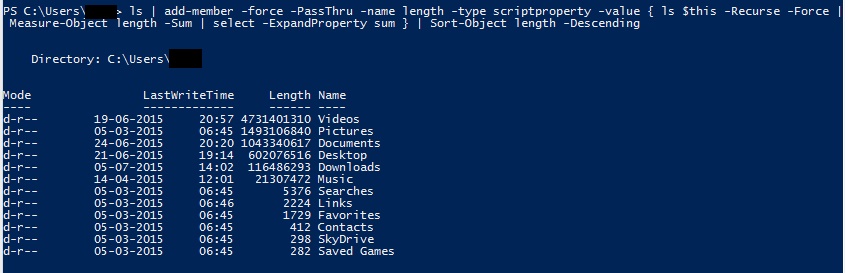
Command line to list top 5 folders name occupying high space as compare to other folders in current directory, this can be change to list top 10 directory by just modifying from -first 5 to -first 10
ls | add-member -force -PassThru -name length -type scriptproperty -value { ls $this -Recurse -force | Measure-Object length -Sum | select -ExpandProperty sum } | Sort-Object length -Descending | select -First 5

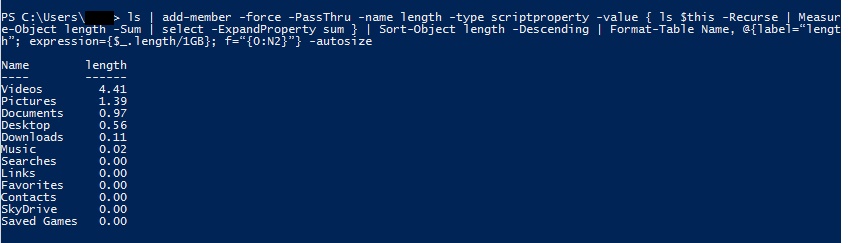
Command line to list current directory size and format the expression to display the size in GB.
ls | add-member -force -PassThru -name length -type scriptproperty -value { ls $this -Recurse -force | Measure-Object length -Sum | select -ExpandProperty sum } | Sort-Object length -Descending | Format-Table Name, @{label=“length”; expression={$_.length/1GB}; f=“{0:N2}”} -autosize

2015年9月16日
利用google cache 破解網頁鎖右鍵
平常都用js書籤的方式
然後再點選純文字版
還有一招是利用google的cache
方式如下:
如個有個網站 http://u.cannot.copy.www 不給右鍵反白複製
就搜尋「cache:http://u.cannot.copy.www 」(chrome的話 直接打在網址列即可)
然後再點選純文字版
2015年8月28日
2015年8月27日
如何快速刪除 Excel 資料庫中所有的空白列,而不需要一列一列的刪除?
https://support.microsoft.com/zh-tw/kb/2679461
1. 選取整個資料範圍,【常用】索引標籤→【編輯】群組→【尋找與選取】→【特殊目標】。
2.在【特殊目標】對話方塊中,點選【空格】,再按下【確定】。
3. 所有空白列都在選取的狀態,點按【常用】索引標籤→【儲存格】群組→【刪除】。
DONE!
1. 選取整個資料範圍,【常用】索引標籤→【編輯】群組→【尋找與選取】→【特殊目標】。
2.在【特殊目標】對話方塊中,點選【空格】,再按下【確定】。
3. 所有空白列都在選取的狀態,點按【常用】索引標籤→【儲存格】群組→【刪除】。
DONE!
2015年7月28日
[ORACLE] Data got commited in another/same session, cannot update row.
Try unselecting
use ORA_ROWSCN for DataEditor insert and update statement
in tools->preferences->database->object viewer
use ORA_ROWSCN for DataEditor insert and update statement
in tools->preferences->database->object viewer
2015年7月13日
將 Python 檔案編譯成 exe (執行檔) - py2exe
1下載與使用的 Python 相對應的版本的 py2exe 工具 安裝好
2. 準備 steup.py 檔案
*xxx.py是要準備變成exe檔的檔案
*xxx.py可以需要完整路徑:D:\\CODE\\Python\\xxx.py
3.打開 cmd
*指令可能要完整路徑
ex:C:\Python27>python "D:\CODe\Python\setup.py" install
*完成後會在 Python27 產生出 dist 跟 build 二個資料夾,執行檔在 dist 裡
--------
2. 準備 steup.py 檔案
from distutils.core import setup

import py2exe

setup(console=['xxx.py'])
*xxx.py是要準備變成exe檔的檔案
*xxx.py可以需要完整路徑:D:\\CODE\\Python\\xxx.py
3.打開 cmd
python setup.py install
python setup.py py2exe
*指令可能要完整路徑
ex:C:\Python27>python "D:\CODe\Python\setup.py" install
*完成後會在 Python27 產生出 dist 跟 build 二個資料夾,執行檔在 dist 裡
--------
執行exe檔
打開cmd
打開cmd
C:\Python27\dist>xxx.exe
2015年6月17日
訂閱:
文章 (Atom)